TechoSolara is an Android app that helps homeowners find out whether their roof is a good candidate for solar panels – before spending a penny on a survey or installer quote.
This guide will walk you through what the app does, the values it needs, how to get them, and what to look out for.
The app has three screens. The Surveyor screen automates as much as possible when you are at the property. The 3-Aspect Planner lets you assess up to three roof slopes on a single property – useful if you are not at the property, or have no sensors. The Pitch Calculator helps you work out your roof angle from a photo or measurement. These screens are accessed via the menu button (three vertical dots) at the top right.
When you open the app, it starts on the Surveyor Screen unless your device has no GPS or pitch sensor, in which case it defaults to the 3-Aspect Planner. The rest of this guide walks you through each screen.
Installing solar panels is a significant investment. The key question most homeowners ask first is: will my roof actually generate useful energy, or will it spend most of the year in shade or pointing the wrong way?
The answer depends on three things about your roof:
TechoSolara takes these three values, applies the same solar geometry used by professional assessment tools, and gives you a month-by-month breakdown of how much solar energy your roof could capture – no installer or engineer visit required, achieved in seconds.
💡 The app works entirely offline. You can use it in airplane mode or without a data connection. Your location data never leaves your device.
There is also an FAQ page for common questions.
The three values you need are explained in the sections below.
These tell the app where in the world you are. Your latitude determines the path the sun takes across the sky throughout the year, so a roof in Edinburgh behaves very differently from one in Seville.
The easiest way to get these is to let the app find them for you:
If you prefer not to use GPS, or you want to assess a property you are not currently standing at:
💡 It's worth knowing what your country's highest and lowest latitudes are to sanity check the values.
Negative values indicate the southern hemisphere: this is normal and expected.
Aspect is the compass direction your roof faces, measured in degrees clockwise from north. A roof facing due south has an aspect of 180°. Due east is 90°, due west is 270°.
In the northern hemisphere, south-facing roofs receive the most solar energy. East and west-facing roofs receive significantly less. North-facing roofs are generally poor candidates.
In the southern hemisphere, north-facing roofs receive the most solar energy. East and west-facing roofs receive significantly less. South-facing roofs are generally poor candidates.
How to find your aspect:
💡 You do not need to be precise to the nearest degree. An accuracy of ±10° is perfectly adequate for a viability assessment.
Pitch is the angle of your roof from horizontal, measured in degrees. A flat roof is 0°. A very steep roof might be 50° or more. Most roofs in temperate climates fall between 30° and 45°. Every country has its own common roof pitch, designed around coping with the prevailing climate.
The quickest way to measure pitch is with the app’s built-in inclinometer:
If you cannot safely access the roof, use the Pitch Calculator in the menu instead.
💡 Safety first – never climb onto your roof to take a measurement. The inclinometer works just as well on a window board, a Velux frame, or a straight edge held against the slope from ground level.
Use this screen when you are at the property and your device has GPS and a pitch sensor. TechoSolara can measure your location and roof angle automatically. See 1. Latitude and Longitude, 2. Aspect, and 3. Pitch above for how each value is obtained.
Many homes have more than one roof slope worth considering. For example: a main south or north facing rear roof, plus east and west-facing side slopes. The 3-Aspect Planner lets you assess up to three slopes in a single calculation.
This screen is also useful if you are not at the property, or if your south-facing roof is shaded and your east/west slopes are the only viable option.
Enter the shared latitude and longitude for the property, then the aspect and pitch for each slope separately. Only the first slope is required; the second and third are optional.
Once you have entered your values, choose how to view the results using the selector above the Calculate button:
The cumulative summary also shows the worst winter daily generation window (see the graph below), the best summer window, and the total annual generation time across all slopes – a quick overall picture of the building’s solar potential.
💡 Batteries can help you make use of generation at either end of the day. For households that are not at home during daylight hours, east and west-facing installations can sometimes offer better practical value than a south-facing roof – without the cost of battery storage.

💡 The Comparison Report answers “which roof is best?” The Cumulative Report answers “what could the whole building generate?”
If you know the width and height of your roof’s gable end, TechoSolara can calculate the pitch for you – no trigonometry required, and no protractors. As per the ancient Greek mathematicians, we make use of Pythagoras.
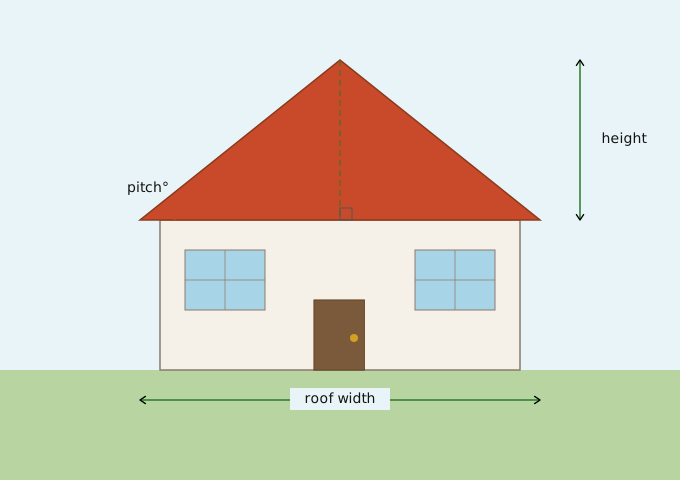
You can take measurements directly, or estimate from a photograph of the gable end. Any consistent unit will do – centimetres, inches, or even pixel counts from a photo – as long as you use the same unit for both measurements.
Enter the width and height into the respective fields. The calculated pitch is passed directly through to whichever screen you came from.
💡 The Pitch Calculator assumes a symmetric roof and halves the total gable width for you. If your roof is asymmetric, estimate where the perpendicular height falls (as shown in the diagram), measure the horizontal distance from that point to the eaves, and double it to get the width to enter.
After tapping Calculate Solar Potential, the app shows a monthly table with:
The annual average score and overall interpretation appear above the table.
A score in the Good or Excellent band indicates a site well worth a professional assessment. Poor or OK scores do not rule solar out entirely – if summer months score well, generation may still be viable. If you are running a heat pump, you may want to discuss winter optimisation with your installer, as there can be a trade-off between winter and summer performance.
💡 Poor winter scores are normal and expected across the UK. What matters most is the summer and shoulder months.
Once you have your results, you can email them as a formatted report. Tap the menu (three vertical dots, top right) and choose “Email report”. This is useful for sharing with an installer, a family member, or simply keeping a record.
The app does not access your contacts. When the email app opens, type the address and send as normal.
The report includes your location, aspect, pitch, the full monthly table, and the overall interpretation.
The following issues are known and will be addressed in a future update.
Questions, comments, or something not working as expected? We’d be glad to hear from you.
Please get in touch at: [email protected].
If you are interested in what is coming next, take a look at the TechoSolara roadmap.
Patent pending: GB2604728.2 | © 2026 Sam J Watkins and TSamko Ltd.
TechoSolara © 2026 TSamko Ltd. All rights reserved.